HTTP vs HTTPS: A Developer's Guide to Secure Web Communication
Table of Contents
- What is HTTP?
- What Does a Typical HTTP Request Look Like?
- The relationship between the OSI model and the HTTP protocol ?
- Introduction to HTTPS
- HTTPS on Modern Browsers
- Why is HTTPS Important?
- How Does HTTPS Work?
- Reference
1. What is HTTP?
Hypertext Transfer Protocol, commonly known as HTTP, is a set of communication rules that governs how data is exchanged between a client and a server on the web. When you type a URL into your browser and press Enter, your browser acts as the client. It sends an HTTP request to a web server, and the server replies with an HTTP response containing the page content. Throughout this exchange, data travels across the network as plain, readable text.
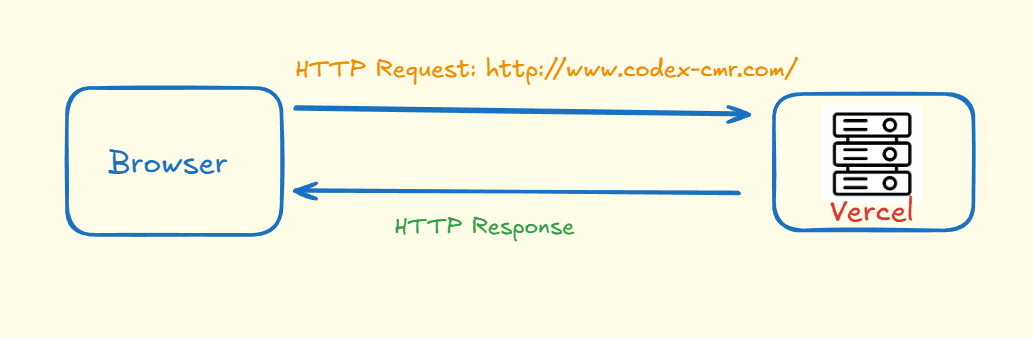
HTTP is classified as an application layer protocol within the Open Systems Interconnection model, which means it operates at the topmost layer of the network stack, Layer 7. This positioning is significant: it means HTTP sits closest to the user and relies on the layers beneath it to handle the physical transmission of data. To understand why this matters for security, it helps to first look at what an HTTP request actually contains.
2. What Does a Typical HTTP Request Look Like?
When a browser navigates to a URL such as http://www.codex-cmr.com/, it constructs a structured HTTP request and sends it to the web server. A typical request looks like this:
GET / HTTP/1.1
Host: www.codex-cmr.com
User-Agent: Mozilla/5.0 ...
Accept: text/html
Accept-Language: en-US,en;q=0.9
Accept-Encoding: gzip, br
Connection: keep-alive
Cookie: session=abc123
Every HTTP request is composed of three main parts.
The first is the request line. This is the opening line of the request and contains three pieces of information: the HTTP method, the resource path, and the protocol version. In the example above, GET tells the server that the browser wants to retrieve data. The / indicates the root path, which corresponds to the homepage. HTTP/1.1 identifies the version of the protocol being used.
The second part is the headers. Headers are key-value pairs that carry metadata about the request. Host tells the server which domain is being requested, which is important because a single server can host multiple websites. User-Agent identifies the browser and operating system making the request. Accept communicates the content formats the browser is prepared to handle. Cookie may include a session token that keeps the user logged in between requests.
After the headers, there is a mandatory blank line. This blank line acts as a separator and signals to the server that the headers have ended.
The third part is the optional body. A GET request typically has no body, since it is only retrieving data. A POST request, on the other hand, usually carries a body containing the data being submitted. Here is an example of a login request:
POST /api/login HTTP/1.1
Host: www.codex-cmr.com
Content-Type: application/json

{
  "email": "user@mail.com",
  "password": "secret"
}
In summary, every HTTP request follows this structure:
[METHOD] [PATH] [VERSION]
[HEADERS]

[BODY — optional]
So when someone types www.codex-cmr.com into their browser, it sends a GET / request, and the server responds with HTML, CSS, JavaScript, or a redirect. All of this communication happens within the network model described in the next section.
3. The relationship between the OSI model and the HTTP protocol ?
The Open Systems Interconnection model, or OSI model, is a conceptual framework developed by the International Organization for Standardization. Its purpose is to give different computer systems a common language for communication, regardless of their underlying hardware or software. By dividing network communication into seven distinct layers, the OSI model makes it easier to understand where a given protocol operates and what it is responsible for.
The seven layers, from top to bottom, are as follows.
- Layer 7, the Application Layer, is where user-facing applications interact with the network. This is the layer where HTTP lives.
To know more about the functionality of the other layers , check this article:
https://www.cloudflare.com/learning/ddos/glossary/open-systems-interconnection-model-osi/
Because HTTP operates at Layer 7, it depends on every layer below it to deliver its messages. This also means that any weakness in how HTTP packages its data, such as sending it as plaintext, affects every request made through it. That weakness is exactly what HTTPS is designed to fix.
4. Introduction to HTTPS
Every day, people transmit sensitive information over the internet: banking credentials, medical records, login passwords, and payment details. HTTP is capable of carrying all of this data, but it offers no protection for it. Because HTTP sends everything as plaintext, any attacker who can position themselves between the client and the server can read the data directly. This is known as a man-in-the-middle attack, and it requires no sophisticated tools to execute, particularly on public or unsecured networks.
HTTPS, which stands for Hypertext Transfer Protocol Secure, solves this problem by wrapping HTTP inside an encryption layer.
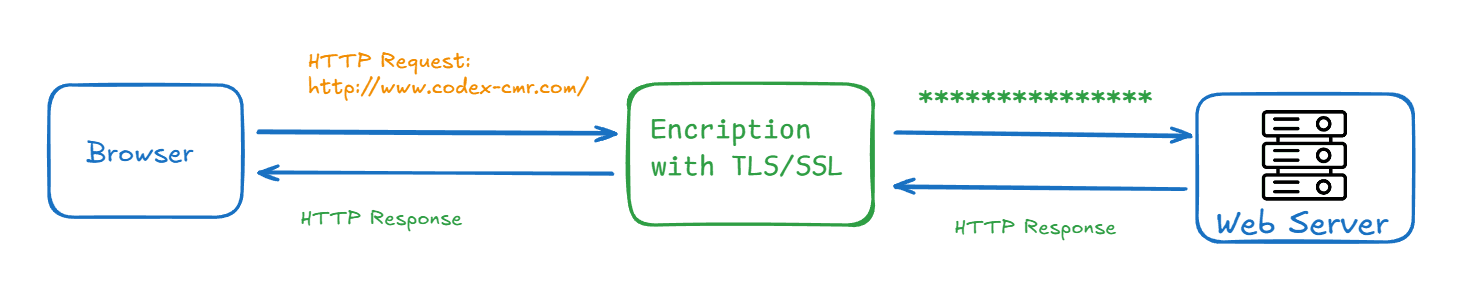
Before any data leaves the browser, it is transformed into ciphertext using a shared secret key. Even if an attacker intercepts the transmission, all they see is scrambled, unreadable data. The server, which holds the corresponding key, is the only party capable of decrypting and reading the original content.
The encryption layer used by HTTPS is the Transport Layer Security protocol, commonly known as TLS. The following sections explain how browsers signal this security to users, why it matters in practice, and how TLS actually works under the hood.
5. HTTPS on Modern Browsers
Any website that handles user credentials or personal data should use HTTPS. Modern browsers such as Chrome, Firefox, and Edge have made this expectation visible to everyday users. When a site is served over plain HTTP, the browser marks it with a "Not secure" label in the address bar, directly next to the URL. When a site uses HTTPS, a padlock icon appears in its place, giving users a clear visual signal that the connection is encrypted and that the server's identity has been verified.

This distinction matters in practice. Users who see the "Not secure" warning on a login or payment page are right to be cautious. Browsers surface this information precisely because the consequences of submitting sensitive data over an unencrypted connection can be severe. For developers and site owners, the takeaway is straightforward: HTTPS is no longer optional for any site that asks users to trust it with their data.
6. Why is HTTPS Important?
The most immediate reason HTTPS matters is that it protects data in transit. When information is sent over HTTP, it travels as a stream of packets that can be captured and read by anyone on the same network using freely available software. On public Wi-Fi, this is a routine risk. A single unencrypted login form is enough exposure for an attacker to harvest a user's credentials.
HTTPS eliminates this risk by ensuring that even if packets are captured, they are unreadable. The difference is stark. A piece of plaintext such as "This is a string of text that is completely readable" becomes something like ITM0IRyiEhVpa6VnKyExMiEgNveroyWBPlgGyfkflYjDaaFf/Kn3bo3OfghBPDWo6AfSHlNtL8N7ITEwIXc1gU5X73xMsJormzzXlwOyrCs+9XCPk63Y+z0= after encryption. Without the key, that ciphertext is computationally impossible to reverse.
There is a second, less obvious benefit. On sites served over HTTP, Internet service providers and other network intermediaries can inject content into the page before it reaches the user, without any knowledge or consent from the website owner. This most commonly takes the form of advertising. An ISP can insert paid ads into pages served to its customers, collecting the ad revenue while the website owner bears the reputational cost of unexpected content appearing on their site. Because HTTPS encrypts the entire HTTP response, no intermediary can modify it in transit. What the server sends is exactly what the browser receives.
7. How Does HTTPS Work?
HTTPS uses the Transport Layer Security protocol to encrypt the HTTP communication channel. TLS was preceded by Secure Sockets Layer, or SSL, and the two terms are sometimes used interchangeably in everyday conversation, though TLS is the current standard. At its core, TLS relies on a form of cryptography called asymmetric public key infrastructure to establish a secure connection.
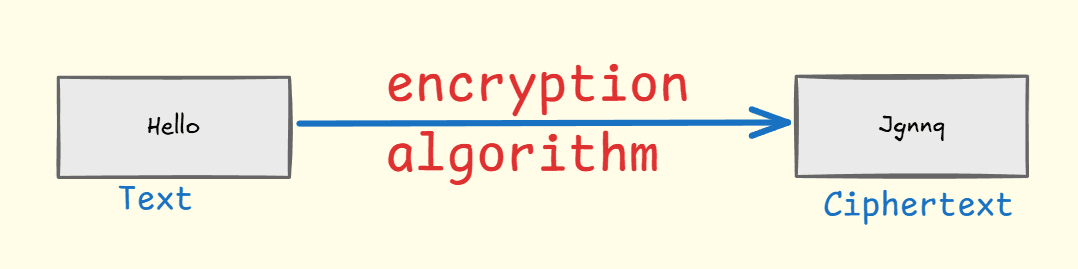
To grasp what encryption means in practical terms, consider a simple analogy. Alice wants to send the message "Hello" to Bob without anyone else being able to read it. She and Bob agree in advance that the rule is to shift each letter two positions forward in the alphabet. Alice transforms "Hello" into "Jgnnq" before sending it. Anyone who intercepts the message sees only "Jgnnq." Bob, knowing the key is 2, shifts each letter back and recovers "Hello." TLS uses the same logical principle, though the mathematics are vastly more complex and the keys are generated fresh for every session.
The TLS Handshake
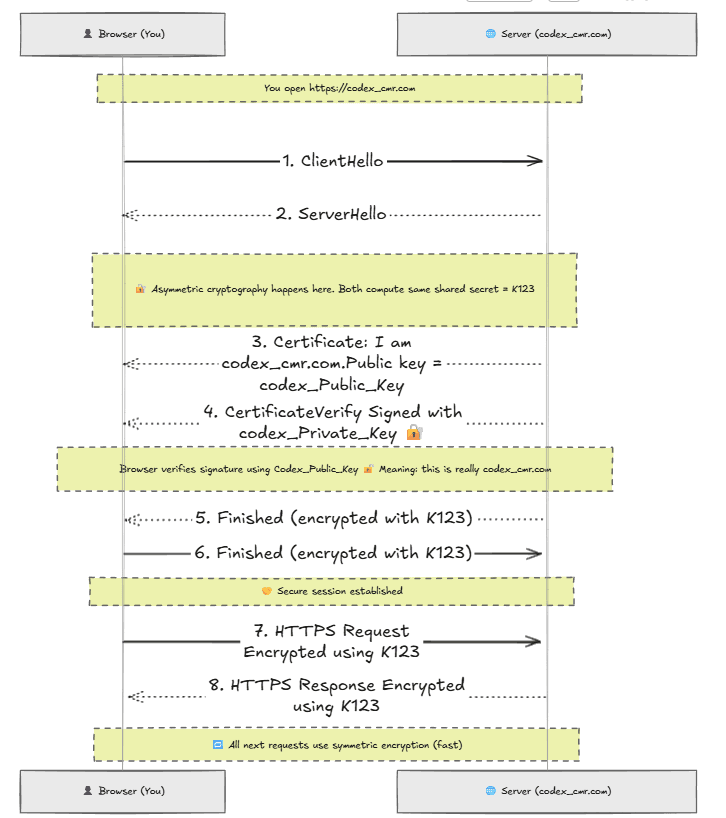
Before any encrypted data can be exchanged, the browser and server must complete a process called the TLS handshake. The purpose of the handshake is for both parties to authenticate one another, agree on a shared secret key, and establish the encryption parameters for the session. The most important property of this process is that the shared secret never travels across the network. Both sides derive it independently, which means an attacker who observes the entire handshake still cannot determine the key.
Step 1: Browser says hello (ClientHello)
The browser opens the connection by sending a ClientHello message. This message includes the highest TLS version the browser supports, typically TLS 1.3 in modern sessions, along with a randomly generated number and a temporary public key created specifically for this handshake.
Step 2: Server replies (ServerHello)
The server responds by selecting a TLS version and an encryption algorithm from those the browser offered. A common choice is AES-256-GCM, which is a symmetric encryption algorithm known for its speed and security. The server also sends its own random number and its own temporary public key.
Step 3: Both parties derive the same secret key
This is where the cryptographic elegance of the process becomes clear. The browser takes its own temporary private key and combines it mathematically with the server's temporary public key. The server does the same in reverse, combining its temporary private key with the browser's public key. Because of the mathematical properties of the Elliptic Curve Diffie-Hellman Ephemeral algorithm, known as ECDHE, both calculations produce the same result: a shared secret. That secret was never sent anywhere. It was computed independently on each side, so even a perfect recording of the entire handshake gives an attacker nothing useful.
Step 4: Server sends its certificate
To prove that it is who it claims to be, the server sends a digital certificate. The certificate is issued by a trusted Certificate Authority and contains the domain name, the server's long-term public key, and the CA's digital signature. The browser checks this signature against its built-in list of trusted Certificate Authorities to confirm the certificate is legitimate.
Step 5: Server proves ownership
The server signs a piece of the handshake data using its long-term private key. The browser verifies this signature using the public key embedded in the certificate. A successful verification confirms two things: the server genuinely controls the domain, and no man-in-the-middle has substituted a different server in the communication path.
Step 6: Handshake concludes
Both sides exchange encrypted "Finished" messages using the shared secret. These messages confirm that the handshake completed without interference and that both parties are ready to begin secure communication.
Step 7 onward: Encrypted data exchange
From this point forward, all HTTP traffic is encrypted with the shared secret. A payment submission such as POST /pay with card data travels as ciphertext. An attacker monitoring the network sees nothing interpretable. The server's response, for example 200 Payment successful, is equally protected. The user's session is private from start to finish.
Reference:
- https://www.cloudflare.com/learning/ddos/glossary/open-systems-interconnection-model-osi/
- https://www.cloudflare.com/learning/ssl/why-is-http-not-secure/
- https://www.cloudflare.com/learning/ssl/what-is-https/
- https://www.cloudflare.com/learning/ssl/transport-layer-security-tls/
- https://www.cloudflare.com/learning/ssl/how-does-public-key-encryption-work/