The Provider, Container, and Component Pattern in React
Table of Contents
- Project Overview
- The Problem with No Structure
- Introducing the Three-Layer Pattern
- The Provider: The Brain
- The Container: The Bridge
- The Component: The Display
- Code Structure Templates
- A Full Feature Example: Todo List
- Scaling to Multiple Features
- A Decision Roadmap for Every Feature
- Conclusion
1. Project Overview
What is the overall goal?
The goal of this article is to deeply understand and document the Provider, Container, and Component pattern in React. This is a structured approach to organizing feature-level code by separating concerns into three distinct layers, each with a single, clearly defined responsibility.
What problem are we solving?
As a React application grows, putting state, logic, and UI in the same component leads to code that is hard to read and maintain. It causes state to be passed through many layers of props, a problem commonly called prop drilling. It produces components that are impossible to reuse because they are tightly coupled to their data source. And it leaves no clear answer to the question of where a given piece of code belongs.
The Provider, Container, and Component pattern solves all of this by giving every piece of code exactly one place to live.
2. The Problem with No Structure
To understand why the pattern matters, it helps to see what happens without it. Here is a basic counter component where state, logic, and JSX all live together:
function App() {
  const [count, setCount] = useState(0)
  return (
    <div>
      <p>{count}</p>
      <button onClick={() => setCount(count + 1)}>+1</button>
    </div>
  )
}
For a single counter, this works fine. But the moment the feature grows to include multiple components, shared state, and complex logic, everything becomes entangled. There is no separation of concerns, no clear ownership of data, and no way to reuse any individual piece in isolation. The pattern described in this article exists to solve exactly this problem.
3. Introducing the Three-Layer Pattern
The entire concept can be expressed in one line:
Provider → Container → Component
Each layer has a single sentence that describes its responsibility:
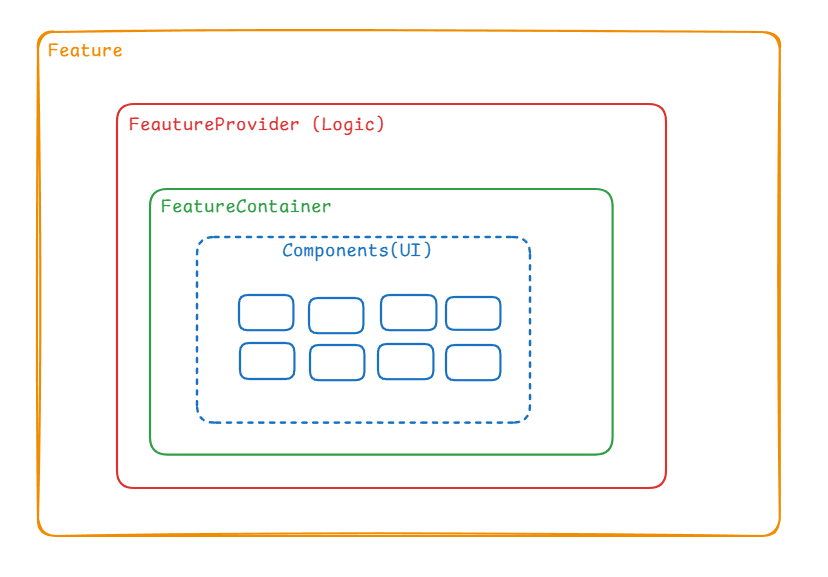
The Provider owns the state and the logic. It is the single source of truth for the entire feature. The Container reads from context, prepares the data, and decides how the feature is visually structured. The Component receives plain props and renders JSX, and nothing else.
Think of it using the human anatomy analogy. The Provider is the nervous system: it controls everything and all decisions pass through it. The Container is the skeleton: it gives structure and holds everything in the right place. The Component is the skin: it is what the user actually sees.
4. The Provider: The Brain
The Provider owns everything related to data and behavior. It never renders visible UI. It only wraps its children in a context and exposes the data and actions they need.
There are five categories of things that belong in a Provider.
State declarations are the raw data the feature depends on, declared with useState:
const [todos, setTodos] = useState([])
const [loading, setLoading] = useState(false)
const [error, setError] = useState(null)
Action functions are the only ways the state can be changed:
function addTodo(title) { setTodos(prev => [...prev, ...]) }
async function fetchTodos() { setLoading(true); ... }
Derived values are computations based on the state, declared with useMemo:
const completedCount = useMemo(() => todos.filter(t => t.done).length, [todos])
const isEmpty = useMemo(() => todos.length === 0, [todos])
Side effects handle things that happen automatically, declared with useEffect:
useEffect(() => { fetchTodos() }, [])
useEffect(() => { localStorage.setItem("todos", JSON.stringify(todos)) }, [todos])
The context value assembles everything the rest of the feature needs and exposes it through the value prop:
<TodoContext.Provider value={{ todos, loading, error, completedCount, addTodo, removeTodo }}>
The thumb rule for the Provider is this: if removing something would break the feature's data or behavior, it belongs in the Provider. If removing it would only affect how things look or where they sit on screen, it belongs somewhere else.
5. The Container: The Bridge
The Container is the only file in a feature allowed to call useContext or the custom hook. Its job is to read from the Provider, prepare any local UI state, and pass everything down to the Components as plain props. It also defines the visual layout of the feature by assembling the Components in its JSX.
An important distinction is that the Container can hold local UI state for things like a controlled input field or a toggle. This kind of state belongs in the Container and not in the Provider, because it is local interaction state and not shared feature state.
6. The Component: The Display
The Component is the blindest layer in the entire system. It receives plain props and renders JSX, and it has no knowledge that context or a Provider even exists. Because of this, it can be placed anywhere in the app, in any feature, on any page, simply by passing it different props.
The moment a Component calls useContext directly, it becomes coupled to one specific context. It can no longer be used anywhere in the app without also having that specific Provider somewhere above it in the tree. The pattern avoids this by keeping all context calls inside the Container, so the Component stays free.
7. Code Structure Templates
The following templates serve as a starting point for any new feature.
Provider template
// FeatureProvider.tsx
import { createContext, useContext, useState, useMemo, useEffect } from "react"
import type { FeatureItem } from "./feature.types"

interface FeatureContextValue {
  data: FeatureItem[]
  loading: boolean
  error: string | null
  derivedValue: number
  doSomething: (input: string) => void
}

const FeatureContext = createContext<FeatureContextValue | null>(null)

export function FeatureProvider({ children }: { children: React.ReactNode }) {

  const [data, setData] = useState<FeatureItem[]>([])
  const [loading, setLoading] = useState(false)
  const [error, setError] = useState<string | null>(null)

  const derivedValue = useMemo(() => data.length, [data])

  useEffect(() => {
    // fetch on mount, sync to storage, etc.
  }, [])

  function doSomething(input: string) {
    // modify state here
  }

  return (
    <FeatureContext.Provider value={{ data, loading, error, derivedValue, doSomething }}>
      {children}
    </FeatureContext.Provider>
  )
}

export function useFeature() {
  const ctx = useContext(FeatureContext)
  if (!ctx) throw new Error("useFeature must be used inside FeatureProvider")
  return ctx
}
Container template
// FeatureContainer.tsx
import { useState } from "react"
import { useFeature } from "./FeatureProvider"
import { FeatureComponent } from "./components/FeatureComponent"

export function FeatureContainer() {

  const { data, loading, error, doSomething } = useFeature()

  const [inputValue, setInputValue] = useState("")

  function handleSubmit() {
    if (!inputValue.trim()) return
    doSomething(inputValue.trim())
    setInputValue("")
  }

  return (
    <div className="max-w-md mx-auto p-6">
      <FeatureComponent
        data={data}
        loading={loading}
        error={error}
        value={inputValue}
        onChange={setInputValue}
        onSubmit={handleSubmit}
      />
    </div>
  )
}
Component template
// components/FeatureComponent.tsx
import type { FeatureItem } from "../feature.types"

interface Props {
  data: FeatureItem[]
  loading: boolean
  error: string | null
  value: string
  onChange: (value: string) => void
  onSubmit: () => void
}

export function FeatureComponent({ data, loading, error, value, onChange, onSubmit }: Props) {
  if (loading) return <p>Loading...</p>
  if (error) return <p className="text-red-500">{error}</p>

  return (
    <div>
      <input value={value} onChange={e => onChange(e.target.value)} />
      <button onClick={onSubmit}>Submit</button>
      <ul>
        {data.map(item => <li key={item.id}>{item.title}</li>)}
      </ul>
    </div>
  )
}
Feature entry point template
// FeatureFeature.tsx
import { FeatureProvider } from "./FeatureProvider"
import { FeatureContainer } from "./FeatureContainer"

export function FeatureFeature() {
  return (
    <FeatureProvider>
      <FeatureContainer />
    </FeatureProvider>
  )
}
8. A Full Feature Example: Todo List
A complete Todo feature demonstrates the pattern with every file written out. The file structure is as follows:
src/
  features/
    todo/
      TodoFeature.tsx
      TodoProvider.tsx
      TodoContainer.tsx
      todo.types.ts
      components/
        TodoInput.tsx
        TodoList.tsx
        TodoItem.tsx
The rendering chain flows as follows. TodoProvider renders first and establishes the context. TodoContainer renders inside it and reads from that context. TodoInput, TodoList, and TodoItem render inside the Container receiving only plain props. Nothing ever skips a layer.
// App.tsx
export default function App() {
  return (
    <TodoProvider>
      <TodoContainer />
    </TodoProvider>
  )
}
9. Scaling to Multiple Features
When a project has more than one feature, the instinct is often to group files by what they are: all providers together, all containers together, all components together. That approach breaks down quickly because jumping between folders to understand a single feature becomes unmanageable. The correct approach is to group by what each file belongs to. Every file for a feature lives inside that feature's folder.
src/
  features/
    counter/
      CounterFeature.tsx
      CounterProvider.tsx
      CounterContainer.tsx
      components/
        CounterUI.tsx

    todo/
      TodoFeature.tsx
      TodoProvider.tsx
      TodoContainer.tsx
      components/
        AddTodo.tsx
        TodoList.tsx

    team/
      TeamFeature.tsx
      TeamProvider.tsx
      TeamContainer.tsx
      components/
        TeamCard.tsx
Each folder is a self-contained mini system. Nothing leaks out unless explicitly exported.
Each feature exposes one top-level wrapper component that assembles Provider, Container, and Components together. This is what the rest of the app interacts with, and it never needs to know about the internal layers.
// features/todo/TodoFeature.tsx
export function TodoFeature() {
  return (
    <TodoProvider>
      <TodoContainer />
    </TodoProvider>
  )
}
App.tsx is then the cleanest file in the whole project. It does not know about state, context, or logic. It only knows which features to display and in what order.
// App.tsx
export default function App() {
  return (
    <div className="space-y-6 p-6">
      <CounterFeature />
      <TodoFeature />
      <TeamFeature />
    </div>
  )
}
The mental model of the full system looks like this:
App.tsx
 ├── CounterFeature   (self-contained black box)
 │     ├── CounterProvider
 │     └── CounterContainer → CounterUI
 │
 ├── TodoFeature      (self-contained black box)
 │     ├── TodoProvider
 │     └── TodoContainer → AddTodo, TodoList
 │
 └── TeamFeature      (self-contained black box)
       ├── TeamProvider
       └── TeamContainer → TeamCard
Each feature is a black box from App.tsx's perspective. Features can be added, removed, or reordered without touching the internals of any other feature. The rule to remember is this: group by feature, not by file type. If all the files for a feature can be deleted together without affecting any other feature, the architecture is correct.
10. A Decision Roadmap for Every Feature
The following questions serve as a checklist before writing any code for a new feature. Going through them in order produces a clear picture of what the Provider needs, what the Components look like, and what the Container connects.
Phase 1: Understand the feature. What does the user see? What can the user do? Does this feature need an API or is everything local?
Phase 2: Design the Provider. What data needs to be stored? Those become useState declarations. What is computed from that data? Those become useMemo declarations. What actions change the data? Those become functions. What happens automatically on mount or when data changes? Those become useEffect declarations.
Phase 3: Design the Components. What are the visual pieces on screen? Each one is a Component. What data does each piece display? Those become its props. What does the user do on each piece? Those become its handler props. If any Component contains logic rather than just rendering, that logic needs to move up.
Phase 4: Design the Container. Which pieces of context does each Component need? The Container reads those through the custom hook. Is there any local UI state such as a controlled input or a toggle? That goes in the Container with useState, not in the Provider. How are the Components arranged on screen? That layout is the Container's JSX.
Phase 5: Final check. Does any Component call useContext? If yes, extract a Container. Does the Provider return visible JSX other than the context wrapper? If yes, move that JSX to the Container. Does App.tsx know anything about state, context, or logic? If yes, something leaked out of the feature.
11. Conclusion
The Provider, Container, and Component pattern is not about following rules for their own sake. It is about giving every piece of code exactly one place to live, so that the feature is easy to read, easy to modify, and easy to reuse. The Provider is the memory of the feature. The Container is the bridge between data and display. The Component is what the user sees, kept free of any dependency on the data layer.
Once this separation becomes natural, scaling from one feature to ten features requires no rethinking of the architecture. Each new feature is a self-contained system that can be dropped into the app without affecting anything else. That is the real value of the pattern.
Thanks for reading .
Alain Ngongang,