Race Conditions in Search Inputs — and How to Fix Them
Table of Content
- Introduction
- What You Will Learn
- Tech Stack
- Prerequisites
- What a Race Condition Actually Is
- The Feature: University Search
- How the Race Condition Appeared
- Solution 1 — Cancel Outdated Requests with AbortController
- Solution 2 — Reduce Requests with Debouncing
- Combining Both Solutions
- Summary

Introduction
The above picture , explain the idea behind race condition — several concurrent processes fighting for the same ressource.
When I was building the CODEX Dashboard and Onboarding Form (v3.0 : Member dashboard + self-serve profile updates), I needed to create a university search input so that users could type their full university name and get matching results.
Check the feature here : https://www.alainngongang.dev/projects#codex@v3.0
The feature seemed straightforward: call an API on every keystroke, display what comes back.
But a subtle bug kept appearing . the dropdown would occasionally show results that didn't match what the user had typed. The culprit was a race condition, and understanding it changed how I think about async frontend code entirely.
This article walks through what race conditions are, how one appeared in a real search input, and two concrete solutions you can apply today.
What you will learn
By the end of this article you will understand what a race condition is and why it is especially common in search inputs, how to reproduce one with a simple TypeScript function, and two complementary strategies to eliminate it: request cancellation with AbortController, and input debouncing.
Tech Stack
- TypeScript
- React (useState, onChange)
- Native fetch API
- Hipo University Domains API
Prerequisites
- You should be comfortable with async/await in JavaScript, basic React state management, and what an HTTP request/response cycle looks like. No advanced knowledge is required.
What a Race Condition Actually Is
A race condition is what happens when two or more operations are competing to read and modify the same piece of data at the same time, and the final result depends on which one finishes first.
The word "race" is literal , the operations are racing each other, and whoever wins the race determines the outcome.
The dangerous part is that the outcome is unpredictable and non-deterministic, meaning the same code can produce different results on different runs, on different machines, or simply depending on how fast the system is running at that particular moment.
The core problem is always the same pattern:
shared data
+ async operations
+ multiple concurrent requests
= a race condition
one operation reads a value, a second operation reads the same value before the first one has finished writing its update back, and then both operations write their result based on the original value they each read , meaning one of the writes silently overwrites the other and the intervening work is lost.
On the frontend, race conditions most commonly appear when multiple API requests are triggered in quick succession and responses arrive out of order. The next section shows exactly how that happened in the CODEX search input.
The Feature: University Search
The CODEX onboarding form includes a search input where users type the name of their university. On the backend, a database of universities is exposed through a REST API — specifically the Hipo University Domains API.
Example universities:
- Technical University of Berlin
- Humboldt University of Berlin
- University of Heidelberg
- LMU Munich
The flow is simple .The user types a query, the frontend sends a request, the backend queries the database, and the results come back as JSON.
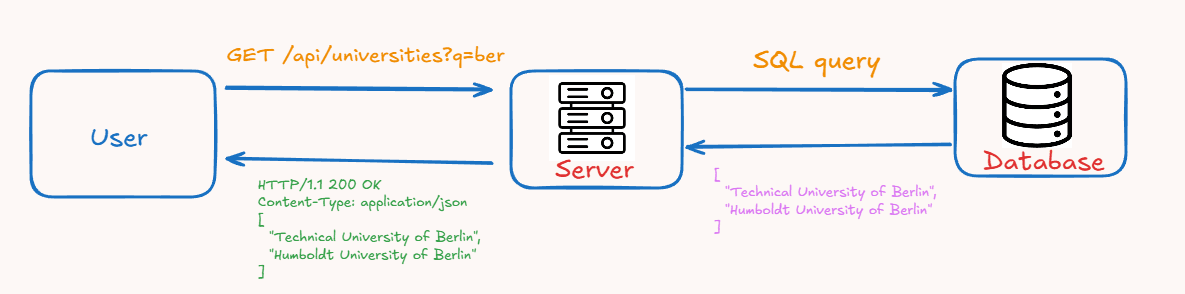
User types:
ber
Frontend sends request:
GET /api/universities?q=ber
Backend searches the database with this query and returns results in JSON-Format :
SELECT name
FROM universities
WHERE name ILIKE '%ber%'
LIMIT 10;
//result
[
  "Technical University of Berlin",
  "Humboldt University of Berlin"
]
That picture becomes more complicated the moment the user starts typing quickly, which is what every user does.
How the Race Condition Appeared
Here is the frontend function responsible for fetching results and updating the UI:
interface University {
  id: number;
  name: string;
  country: string;
}

// Fetches universities from the API whose name matches the given query string.
async function searchUniversities(
  query: string,
  setUniversities: (data: University[]) => void
): Promise<void>{
  try {
    // Send a GET request to the search endpoint with the query as a URL parameter
    const res: Response = await fetch(`/api/universities?q=${query}`);

    if (!res.ok) {
      throw new Error(`Request failed with status ${res.status}`);
    }

    // Parse the JSON response body into a typed array of university names
    const data: University[] = await res.json();

    // Update the component state with the returned list of universities,
    // which triggers a re-render of the results list
    setUniversities(data);
  } catch (error) {
    console.error("Failed to fetch universities:", error);
  }
}
This function is wired to the input's onChange event:
<input
  type="text"
  onChange={(e) => searchUniversities(e.target.value)}
/>
Every keystroke fires a new request. That means when a user types berli, five requests go out almost simultaneously:
GET /api/universities?q=b
GET /api/universities?q=be
GET /api/universities?q=ber
GET /api/universities?q=berl
GET /api/universities?q=berli
Network is non-deterministic by nature, responses do not arrive in the order the requests were sent. A slower server, a larger result set, or momentary congestion can flip the order entirely. So the actual arrival order might look like this:
Example:
| Request | Returns |
|---|---|
| ?q=berl | first |
| ?q=berli | second |
| ?q=be | third |
The UI calls setUniversities each time a response arrives. The last call wins. In this case, the user typed berli but the UI ends up showing results for be , because that response happened to arrive last.
This is the race condition: the final UI state depends not on what the user typed, but on which HTTP response happened to arrive last.
Solution 1 — Cancel Outdated Requests with AbortController
The most direct fix is to cancel any in-flight request as soon as a new one starts. The browser provides a native mechanism for this: AbortController.
To "abort" means to stop or abandon something before it completes. An AbortController is exactly that a controller that decides whether an in-flight operation should be abandoned.
// Holds the controller for the most recent request,
// so we can cancel it if a new request comes in before it resolves
let controller: AbortController | null = null;

async function searchUniversities(
  query: string,
  setUniversities: (data: University[]) => void
): Promise<void> {
  // Cancel the previous request if one is still running
  if (controller) {
    controller.abort();
  }

  // Create a fresh controller for this request
  controller = new AbortController();

  try {
    const res: Response = await fetch(`/api/universities?q=${query}`, {
      signal: controller.signal, // Attach the cancellation signal
    });

    if (!res.ok) {
      throw new Error(`Request failed with status ${res.status}`);
    }

    const data: University[] = await res.json();
    setUniversities(data);
  } catch (error) {
    // AbortError is expected when we cancel a request — ignore it
    if (error instanceof DOMException && error.name === "AbortError") return;
    console.error("Failed to fetch universities:", error);
  }
}
Now when the user types berli, every previous request is cancelled before the next one fires. Only the request for berli ever completes . So the UI always shows the right results.
The key insight here is that we are not ignoring the stale responses, we are actively stopping the network requests themselves. This is more efficient than letting them complete and then discarding the data.
Solution 2 — Reduce Requests with Debouncing
AbortController solves the race condition but still sends many unnecessary requests. Debouncing takes a complementary approach: instead of cancelling old requests, it prevents most of them from being sent in the first place.
"Debounce" means: wait until the user has stopped doing something for a given delay before acting.
source: https://developer.mozilla.org/en-US/docs/Glossary/Debounce
Instead of calling the API on every keystroke, wait a little.
Example: 300ms delay.
const debouncedSearch = debounce(
  (query: string, setUniversities: (data: University[]) => void) => {
    fetch(`/api/universities?q=${query}`)
      .then((res) => {
        if (!res.ok) throw new Error(`Request failed with status ${res.status}`);
        return res.json() as Promise<University[]>;
      })
      .then(setUniversities)
      .catch((error) => console.error("Failed to fetch universities:", error));
  },
  300 // Wait 300 ms after the last keystroke before sending the request
);
With a 300 ms delay, a user typing berli quickly will trigger only one request — for berli — instead of five. This dramatically reduces server load and, because fewer requests compete, significantly reduces the likelihood of a race condition occurring.
That said, debouncing alone does not eliminate the race condition. If the user types slowly, one request per character can still go out, and the out-of-order problem remains. The two solutions work best together.
Combining Both Solutions
In production, you almost always want both. Debouncing reduces the number of requests sent; AbortController ensures that any requests which do overlap can never produce a stale result.
API example:
let controller: AbortController | null = null;

const debouncedSearch = debounce(
  async (query: string, setUniversities: (data: University[]) => void) => {
    if (controller) controller.abort();
    controller = new AbortController();

    try {
      const res = await fetch(`/api/universities?q=${query}`, {
        signal: controller.signal,
      });
      if (!res.ok) throw new Error(`Request failed with status ${res.status}`);
      const data: University[] = await res.json();
      setUniversities(data);
    } catch (error) {
      if (error instanceof DOMException && error.name === "AbortError") return;
      console.error("Failed to fetch universities:", error);
    }
  },
  300
);
Summary
Race conditions in search inputs come from a simple mismatch: requests are sent in one order and responses arrive in another. The UI, which blindly applies each response as it arrives, ends up in a state that no longer reflects what the user intended.
The fix requires two things working together. Debouncing ensures you send far fewer requests in the first place. AbortController ensures that any request which has been superseded by a newer one never gets to update the UI.
A production-grade search input typically also includes result caching, a loading state indicator, and a minimum query length check before sending any request at all. But debouncing and cancellation are the two foundations everything else builds on.
Thanks for reading
Alain Ngongang